Help Center
Everything you need to know about using MemeScout to discover early Solana meme token momentum.
Dashboard Controls
Filters, presets & hotness
Trojan Bot Setup
Quick trade integration
Radar Score
Understanding the scoring
Smart Money
Leaderboard & watchlist
Copy Radar
Screener, Check & Tuner
Subscription Tiers
Feature comparison
Dashboard Controls
Understanding the radar control bar
The dashboard control bar at the top of the /app page gives you powerful tools to filter, sort, and monitor token discoveries in real-time.
Filter Presets
Quickly switch between pre-configured filter combinations to find different types of opportunities:
Standard radar criteria, balanced for discovery
High volume, strong buy pressure tokens only
Focus on freshly created tokens (youngest first)
Only tokens with "Good" risk rating from RugCheck
Click a preset to apply it instantly. The active preset is highlighted. You can further customize with the Filters button.
Hotness Meter
The Hotness Meter shows real-time market momentum based on recent activity:
Use this as a general market temperature indicator. Hot markets often have more opportunities but also more noise.
Notification Controls
Toggle browser notifications to get alerted when new tokens hit the radar:
- • Sound: Play an audio alert when a new token appears
- • Push Notifications: Receive browser notifications (requires permission)
Note: You must allow browser notifications when prompted. Notifications only work while the dashboard tab is open.
Custom Filters
Click the Filters button (far right) to open advanced filter controls:
Market Metrics
- • Min/Max Market Cap
- • Min Liquidity
- • Min Volume (1h)
Token Properties
- • Max Token Age (hours)
- • Min Radar Score
- • Risk Level filter
After adjusting filters, they persist for your session. Click Reset to return to defaults.
Trojan Quick Trade
Integrated with MemeScout for one-tap trading
Trojan on Solana is Solana's fastest, most feature-rich Telegram trading bot. MemeScout's Quick Trade buttons open Trojan with the token address pre-filled.
🎯 Quick Trade Note:MemeScout only supports Trojan Bot for Quick Trade integration. TP/SL settings must be configured directly in Trojan—they apply automatically to all trades.
Getting Started with Trojan
Open Trojan Bot
Click here to open Trojan or search @solana_trojanbot in Telegram.
Create or Import Wallet
Click /start → Choose "Create New Wallet" or "Import Existing". Fund it with SOL for trading.
Configure Settings
Go to Settings from the main menu to customize your trading experience.
Enable MEV Protection
Toggle MEV protection ON in settings. Consider raising gas settings if you experience tx timeouts.
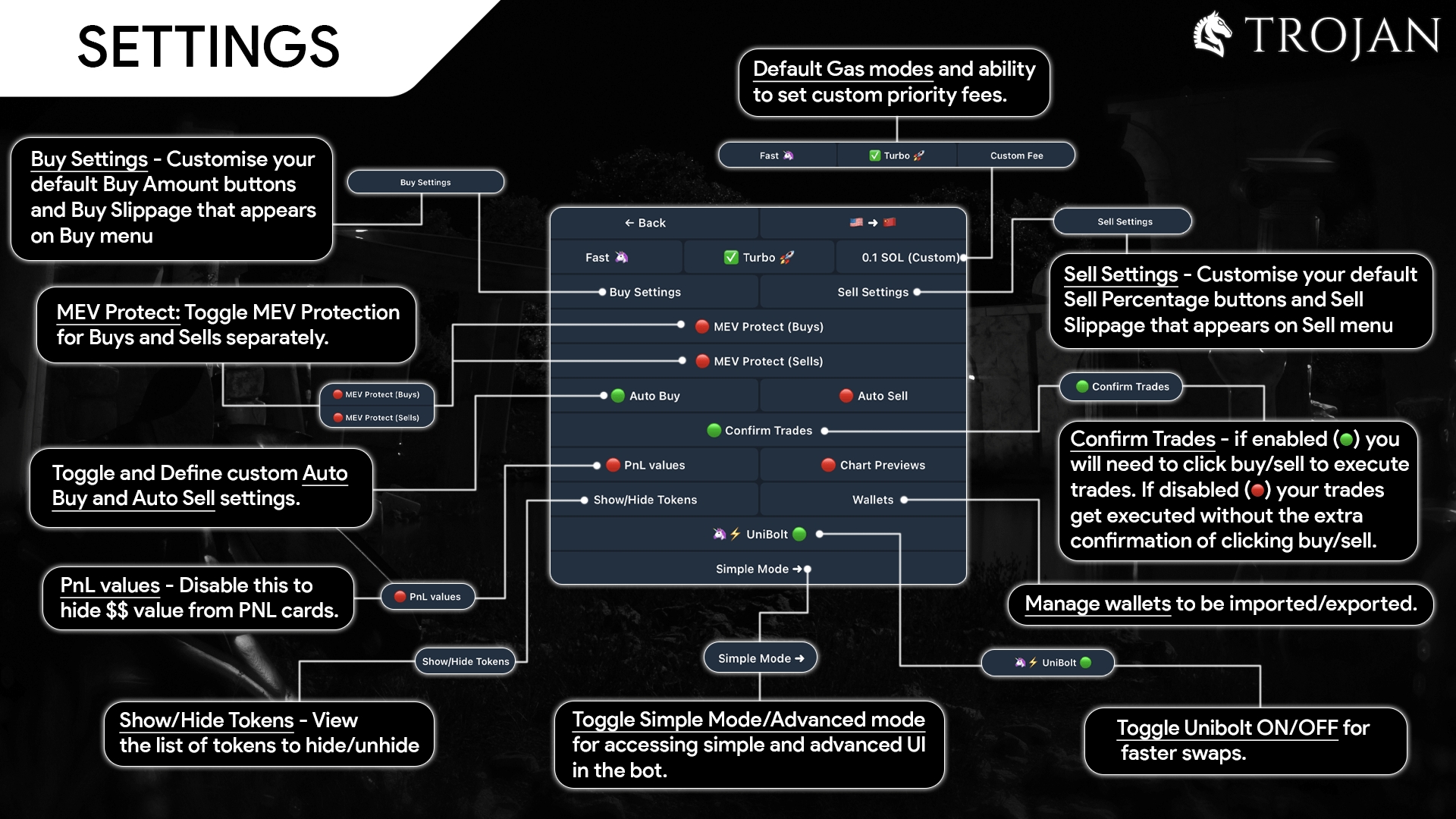
Trojan Settings Menu Overview
AutoSell: Take Profit & Stop Loss Setup
AutoSell automatically sets limit sell orders for every swap or AutoBuy you make. This is the easiest way to protect your trades.
- 1Access AutoSell Settings
Go to Settings → Auto Sell
- 2Toggle AutoSell ON
Enable the feature to activate automatic limit orders
- 3Set Stop Loss (S/L)
Use a negative percentage (-XX%) and set the sell amount to 100%
- 4Set Take Profit (T/P) Orders
Click "Add Order" to add multiple T/P targets. The Amount column should add up to 100%.
- 5Set Slippage
Configure slippage for your AutoSell limit orders (10% is a common setting)
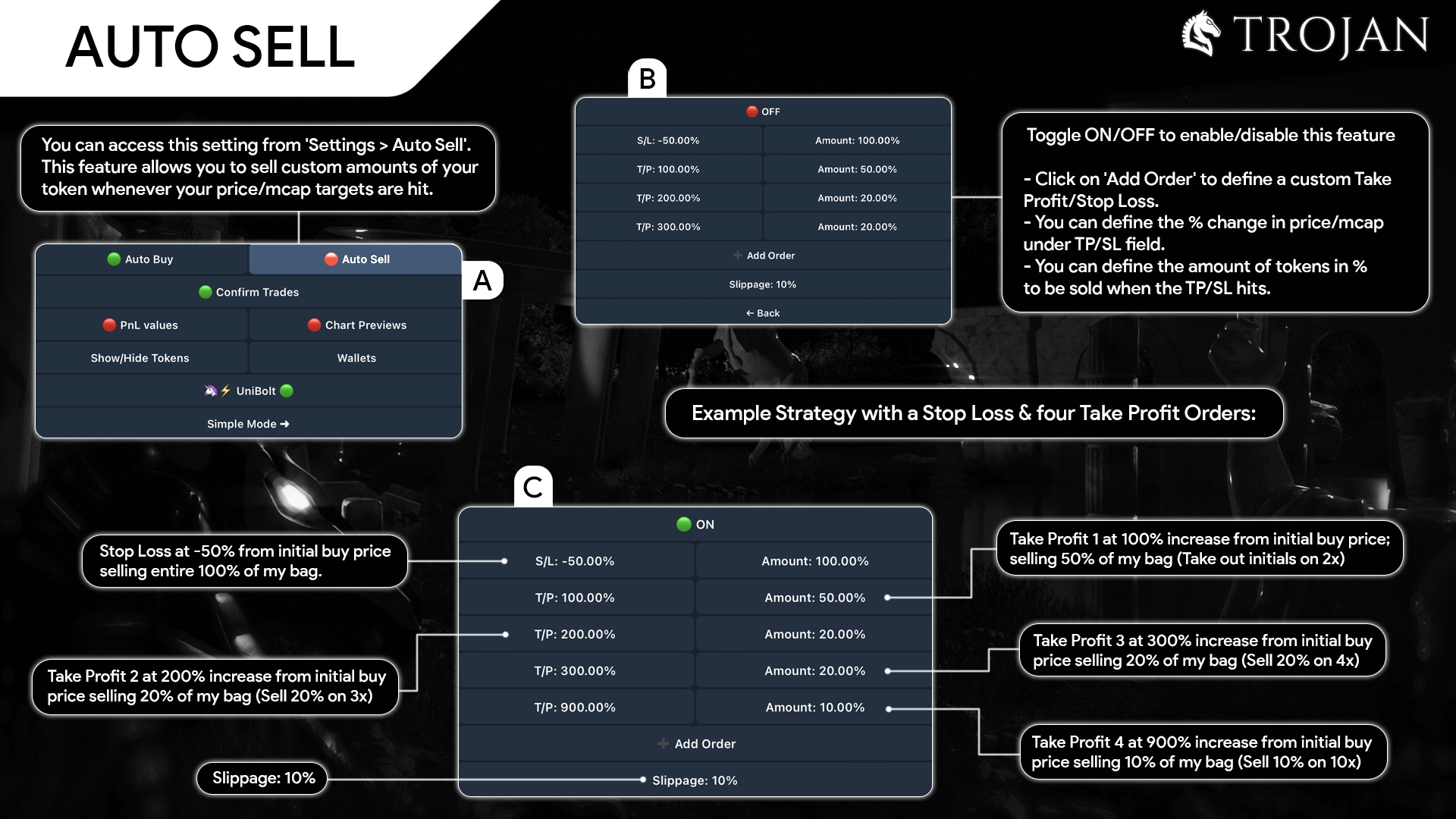
Example: Stop Loss at -50% (100% of bag) + Four Take Profit targets
Example AutoSell Strategy
Stop Loss: -50% → Sell 100% (protects against total loss)
TP 1: +100% (2x) → Sell 50% (take out initial + profit)
TP 2: +200% (3x) → Sell 20%
TP 3: +300% (4x) → Sell 20%
TP 4: +900% (10x) → Sell 10% (moonbag)
Manual Limit Orders (Stop Loss & Take Profit)
For individual trades, you can manually set limit sell orders. This gives you precise control over each position.
Setting a Stop Loss:
- 1Click Sell from the main menu
- 2Select or paste the token address
- 3Make sure the green checkmark is on Limit
- 4Select % to sell (e.g., 100%)
- 5Set trigger using a -% or price/mcap below current
- 6Set expiry (e.g., 30d for 30 days, 2h for 2 hours)
Setting a Take Profit:
- 1Same steps 1-4 as above
- 2Set trigger using a +% or price/mcap above current
- 3Set expiry and confirm
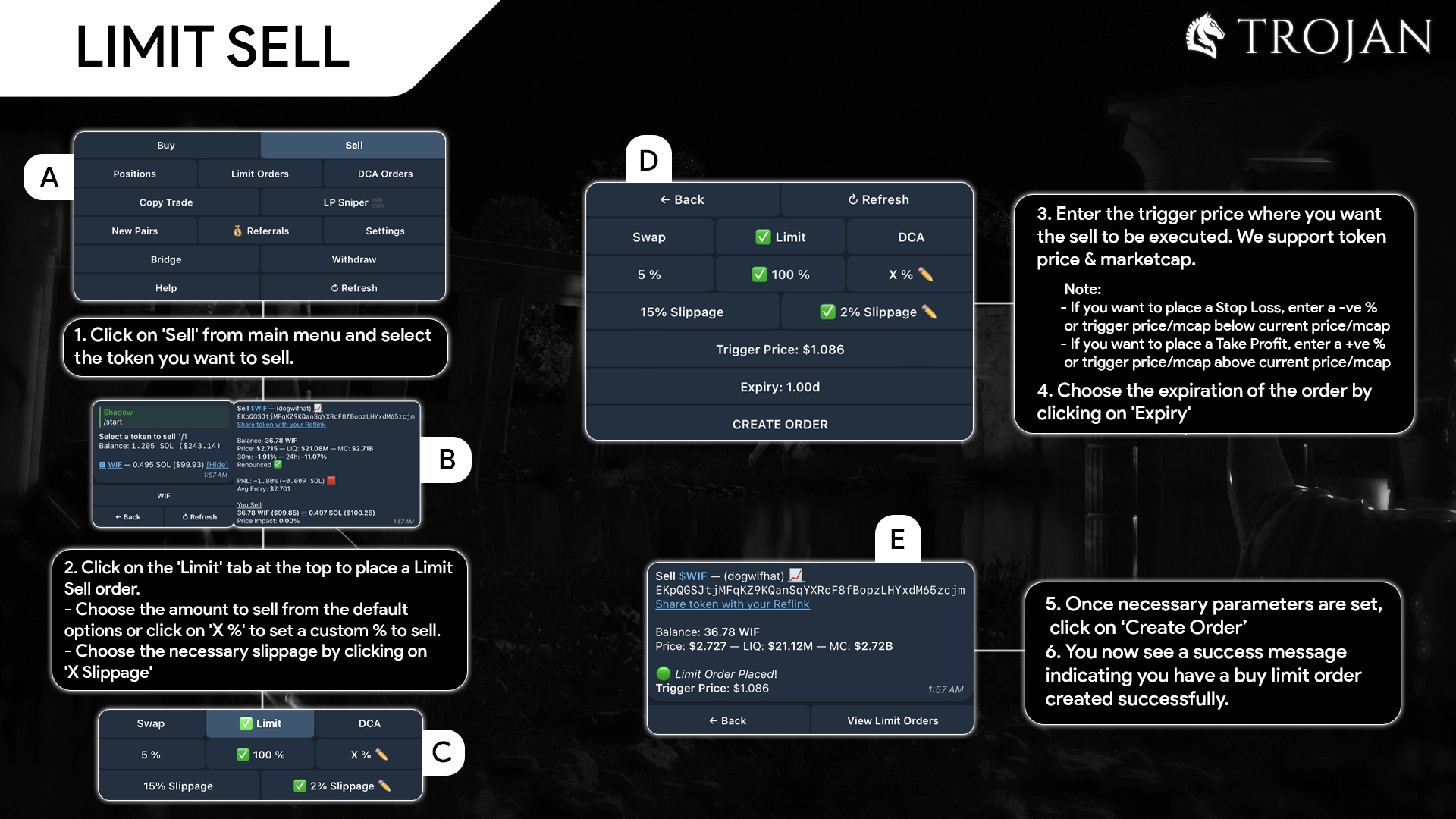
Manual Limit Sell Order Setup
Managing Your Limit Orders
- • From the main menu (/start), click Limit Orders
- • Use Close to cancel specific active orders
- • Use Close All to cancel all active orders
Trailing Stop Loss (Manual Method)
Trojan doesn't have an automatic trailing stop feature, but you can simulate one by manually updating your limit orders as price rises.
- 1Set Initial Stop Loss
Create a limit sell at -30% or your preferred level
- 2Monitor Your Position
Watch the token in Positions
- 3Update Stop as Price Rises
When token pumps, cancel old limit order → create new one at higher price
Example: Manual Trailing Stop
You buy at $100k mcap with stop at $70k (-30%)
• Token hits $150k → Move stop to $105k (lock in 5% profit)
• Token hits $200k → Move stop to $150k (lock in 50% profit)
• Token drops to $150k → Stop triggers, you exit with 50% gain
Configuring Buy Settings
Customize your default buy amounts and slippage for faster trading.
- 1Open Buy Settings
Go to Settings → Buy Settings
- 2Set Buy Amounts
Configure preset buttons (e.g., 0.1, 0.25, 0.5, 1 SOL)
- 3Set Slippage
Default slippage for buy orders (higher = faster fills but worse price)
Official Trojan Documentation
Full tutorials, advanced features, DCA orders, copy trading & more
Understanding Radar Score
The Radar Score (0-100) is a proprietary metric that evaluates early-stage token momentum based on multiple on-chain signals. The minimum score threshold is currently 36, calibrated from backtesting data.
Score Components
Score Modifiers
Good: +20 pts · Warn: neutral · Danger: −25 pts. Based on RugCheck + on-chain signals.
Newer tokens are penalized (≤30m: −20, 31-60m: −15, 61-120m: −10, 121-180m: −5). Data showed fresh tokens hit 5x at just 1.1% vs 13.6% for older tokens.
Stackable penalties up to −50 for active mint authority, freeze authority, mutable metadata, or high wallet concentration — checked at detection time before RugCheck indexes the token.
Tokens where sells > buys × 2 (sell ratio exceeds 66%) are hard-blocked from the radar entirely.
Score Interpretation
Strong momentum signals across multiple metrics
Moderate momentum, worth monitoring
Weaker signals, higher risk (36 is the minimum threshold)
Smart Money Leaderboard
Chad tier exclusive
The Smart Money Leaderboard identifies wallets that consistently buy tokens within minutes of a radar call and achieve high multipliers. Each qualified wallet gets a unique anonymized codename (e.g. "Crimson Jaguar") and a color-coded avatar.
How It Works
The system scans on-chain transactions within 5 minutes of each radar call, identifying wallets that bought the token early.
Each wallet receives an Alpha Score (0-100) based on win rate, average multiplier, trade speed, and consistency. A "win" is any trade achieving ≥2x (peak MC / call MC).
Wallets exhibiting sniper/bot patterns (ultra-fast buy delays, repetitive trading on the same token) are automatically detected and excluded from the leaderboard.
Leaderboard Tools
Mark wallets as checked (green), avoid (red), or retest (yellow). Click to cycle through statuses. Private per user.
Add notes to any wallet — only you can see them. Great for tracking copy-trade results or observations.
Save wallets to your personal watchlist. Rename them to match your copy trading bot. Manage in Account → Watchlist.
Each wallet links to GMGN for profile viewing. Each pick links to DexScreener with the wallet address for trade pattern inspection.
Copy Radar
All paid plans
Copy Radar is copy-trading intelligence for Solana: find traders worth copying, check whether copying them actually made you money, and tune your exits. It reads your wallet on-chain, not your bot, so it works with whatever copy bot you run.
Screener
Ranks Fomo traders by how copyable they are — size, activity and real closed positions.
- Pick a strategy — Needle-movers, Mirror, Mid-cap movers — or save your own filter set.
- Open Filters to change the lookback, sort order and minimums. Every column sorts.
- An amber unclaimed pill means an auto-generated Fomo name: no claimed profile, no audience, no copy wave.
- Copy @handle puts the handle on your clipboard so you can paste it into your copy bot. Add to my traders puts them on your My Traders list. Tune sends them to the Exit Tuner.
- Followers is the trader's Fomo audience. A big audience means a copy wave after each buy, so their entries tend to move the token; an unclaimed name has no audience at all.
- Follower counts come from Fomo's own leaderboards and refresh daily. Traders outside those boards show a dash until someone looks them up.
- When a follower count is unknown the cell shows a dash and a Look up link. Look-ups are expensive, so they are rationed: 3 per account per day and 20 per day across the whole site. A handle with no Fomo profile shows not on Fomo and is never looked up again for 30 days.
- Safety checks a trader's last 20 buys and shows how many were on tokens a copy bot would refuse — deployer can still mint supply or freeze transfers. Traders who mostly buy risky tokens will get you few fills from any bot.
My Traders
The setup page: add your copy wallet(s) and the traders your bot follows. Each trader gets a card with their Fomo profile, followers, resolved wallet and your own size, exit rule and notes.
- Tune exits sends the trader to the Exit Tuner. To copy a handle for your bot, use the Copy @handle button on the Screener.
- Pause keeps a trader's history and stops new attribution. Remove deletes them and orphans their trades. Do not re-add marks them banned so they don't come back via the Screener.
- The tuned exits line at the top is a quick reference of the rule saved against each trader.
My PnL
The results page. Each of your buys is attributed to the trader who bought the same token within the match window before you.
- Per-trader realized PnL, entry slip and fill lag — who you are actually making money from.
- A By wallet table appears when you have more than one copy wallet registered.
- Coverage table: their buys versus what landed in your wallet, with re-buys and risky tokens separated from genuine misses.
- Per-token table shows shared ×N when several traders bought the same token; PnL is split by the dollars each one put in. The First → last column shows your earliest and latest buy on that token (one value when you only bought once).
- Fee reconciliation tile: enter what you deposited and your current balance to see what fees and slippage cost you.
Exit Tuner
Replays a trader's recent buys against 1-minute candles and scores every take-profit / stop-loss / time-cap combination.
- Entry cost is modelled as your base slip plus the leader's own price impact (their buy ÷ 10% of market cap, capped at 30%) — not a flat slippage guess.
- Lookback and max buys interact. A trader making 15 buys a day has far more buys in a 14-day window than the max-buys cap allows. Sample: spread across window (the default) replays an even spread of the whole period; Most recent replays only the latest buys. Either way the results state the true span replayed — e.g. "Replayed 30 of 207 buys · Sep 16 → Sep 18 (2.1 days of the 14 requested)" — and warn you in amber when the cap shortened the window.
- Best is the highest average per trade. Robust is the best rule that also wins at least half the time — usually the one to run.
- Set the min market cap filter to match your bot's MC floor. Below $1M you get a micro-cap warning: the leader's own buy is the pump, so copies fill at the top.
- Runs per day depend on your plan — 6 runs/day on Ape, 15 on Degen, 40 on Chad. Apply to my traders saves the chosen rule onto that trader.
- Results are a ranking, not a forecast. Fees are roughly 4% per round trip, so a rule averaging under +4% per trade is not worth running.
Your wallets and your trader list are private to your account and are never shown to other users.
Copy Radar is included on all paid plans.
Subscription Tiers
🦍 Ape
Basic tier- • Real-time dashboard access
- • Basic filter controls
- • Radar score ranking
- • Token detail pages with AI analysis
- • Daily email digest
- • Calls archive & stats
- • Copy Radar — trader screener, exit tuner, copy-bot check
🔥 Degen
Pro tier- • Everything in Ape
- • Advanced filter controls
- • 15-second data refresh (2x faster)
- • Quick Trade with Trojan
- • Discord alerts
👑 Chad
Power tier- • Everything in Degen
- • Smart Money Leaderboard — anonymized alpha wallets ranked by performance
- • Wallet watchlist — save & rename wallets for copy trading
- • Private wallet annotations — mark wallets as checked/avoid/retest with notes
- • API access — REST & WebSocket for programmatic signal access
- • Priority support
Security Checks
Each token on our radar includes a multi-layered security assessment combining RugCheck data with our own on-chain detection signals.
Risk Levels
No significant risks detected
Some risk factors present—review before trading
Significant risks detected—proceed with caution
Token has been flagged as rugged—avoid
On-Chain Signals (Pre-Indexer)
These checks run at detection time via Helius DAS, before RugCheck or GoPlus have indexed the token — closing the rug-pull window on brand-new tokens.
If not revoked, the dev can inflate supply at any time
If active, the dev can freeze your wallet from selling
If mutable, the dev can rename/rebrand the token mid-pump
High concentration (> 50%) signals coordinated dump risk
Frequently Asked Questions
What is "Pair Age" vs token age?
Pair Age shows when the DEX trading pair was created, not when the token contract was deployed. This is more relevant for trading as it indicates when liquidity became available.
How often is data refreshed?
Ape tier refreshes every 30 seconds. Degen and Chad tiers get 15-second refreshes for faster access to new opportunities.
Is this financial advice?
No. MemeScout provides market intelligence tools only. Always do your own research (DYOR) and never invest more than you can afford to lose.
Will access always be unlimited?
Probably not. Radar focuses on early-stage tokens where liquidity can be thin. If too many users act on the same signal simultaneously, execution quality degrades for everyone. To protect users, we may limit real-time access or introduce tiered availability for certain features as the platform grows. Early users will always be prioritized.
How do I contact support?
Visit our Contact page or reach out on X (Twitter).